
TIFF to PDF: Convert Multi-Page TIFF Files Online
Use this free TIFF to PDF tool to put TIFF images into one PDF, with no signup needed. Every page of a multi-page TIFF becomes a page of the PDF, in the order of the file. You can also add JPG and PNG files to the same job. Results vary with the file, so check the preview before you download.
- Transparent areas become white. The result panel warns you when this happens.
- The PDF has no text layer. A scan stays a picture, and we do not make searchable PDFs.
- A color TIFF can give a PDF several times bigger than the TIFF. Results vary with the file.
Drop TIFF, JPG or PNG files here or choose them. A multi-page TIFF gives all its pages. Drag the files (or use the arrows) into the page order you want. Up to 5 MB per file without an account.
Each page has the size of its picture, using the resolution stored in the file (96 pixels per inch when there is none), plus the margin.
Transparent areas become white, 16-bit pictures are used as 8-bit and color profiles are not applied. A color TIFF can give a PDF several times bigger. One TIFF page can have up to 25 MP.
Complete the human check to enable the button.
Result
Your PDF will appear here.
Without an account: 20 jobs per day, up to 5 MB per file, 20 pictures and TIFF pages and 20 MB together; one TIFF page up to 25 MP, all TIFF pages together up to 60 MP. Signed in: up to 10 MB per file, 100 pictures and pages, up to 120 MP of TIFF pages.
Retention: web-tool results are deleted after 10 minutes and no history is kept. API results are kept 1 day on the free plan and 7 days on Starter and Pro (30 days on Business and Scale).
No account needed
20 PDF jobs per day per visitor.
Every TIFF page
A multi-page TIFF becomes a multi-page PDF. You can mix TIFF, JPG and PNG files and set the page order.
Deleted automatically
Web tool results are removed after 10 minutes.
Privacy: what you submit is used only to make this file. The working copy is deleted when the job ends, the result after 10 minutes. See the privacy policy.
Do this from your code
The same job as API requests: upload each PDF, start the job with the upload ids, then poll it. It needs an API key; a free account can create one.
curl -X POST "https://api.aiipworld.com/v1/uploads" \
  -H "Authorization: Bearer $AIIPWORLD_API_KEY" \
  -H "Content-Type: image/tiff" \
  --data-binary @scan.tiff   # returns {"upload_id": "UPLOAD_ID_1", ...}

curl -X POST "https://api.aiipworld.com/v1/uploads" \
  -H "Authorization: Bearer $AIIPWORLD_API_KEY" \
  -H "Content-Type: image/jpeg" \
  --data-binary @page-2.jpg   # returns {"upload_id": "UPLOAD_ID_2", ...}

curl -X POST "https://api.aiipworld.com/v1/pdf-jobs" \
  -H "Authorization: Bearer $AIIPWORLD_API_KEY" \
  -H "Content-Type: application/json" \
  -d '{"op":"image_to_pdf","params":{},"files":["UPLOAD_ID_1","UPLOAD_ID_2"]}'
# returns {"job_id": "...", "status": "queued"}; then poll:
curl https://api.aiipworld.com/v1/jobs/JOB_ID -H "Authorization: Bearer $AIIPWORLD_API_KEY"
Batches
The web tool puts up to 20 images in one PDF without an account and 100 when signed in. Use the API to run many jobs.
Retention
Web-tool results are kept 10 minutes; free API results 1 day; Starter and Pro results 7 days; Business and Scale 30 days.
In one sentence
A free online tool that puts TIFF files into one PDF, with every page of a multi-page TIFF becoming a PDF page; you can mix TIFF, JPG and PNG files, set the page order and choose the page size.
Key facts
- Input: TIFF, JPG or PNG files, up to 5 MB per file without an account (10 MB signed in), and up to 20 pictures and TIFF pages in one job (100 signed in); BigTIFF is refused.
- Settings: the page order, the page size (the size of the image, A4 or Letter), the orientation and the margin; the page size of the image uses the resolution stored in the TIFF, or 96 dpi when there is none; the result is images.pdf.
- Transparency is put on white, 16-bit pictures are used as 8-bit and color profiles are not applied; a TIFF page is stored without loss, so a color TIFF can give a PDF several times bigger, and the PDF has no text layer.
- In our test a generated 3 page black-and-white TIFF of 17 KB gave a PDF of 3 A4 pages and 32 KB, and a TIFF with a rotation setting gave an upright landscape page; results vary with the file.
- API: POST each file to https://api.aiipworld.com/v1/uploads, then POST https://api.aiipworld.com/v1/pdf-jobs with op image_to_pdf and the upload ids in page order, and poll GET /v1/jobs/:id.
- Free without an account: 20 PDF jobs per day per visitor, no watermark. Signed in, each job costs 1 credit, plus 1 credit for each started 20 pages beyond the first 20 and for each started 20 MB of result beyond the first 20 MB (100 free credits every month).
- Files are deleted automatically: 10 minutes after conversion without an account, 1 day with a free account.
How it works
- Add your TIFF files. A multi-page TIFF is one file in the list, and it gives all its pages.
- Check the order of the list. Drag a file or use the arrows to change it, because the list order is the page order.
- Set the page size, orientation and margin, or keep the defaults.
- Start the conversion. The result is one PDF named images.pdf.
- Check the preview in the result panel and download the file before the link expires.
Example output
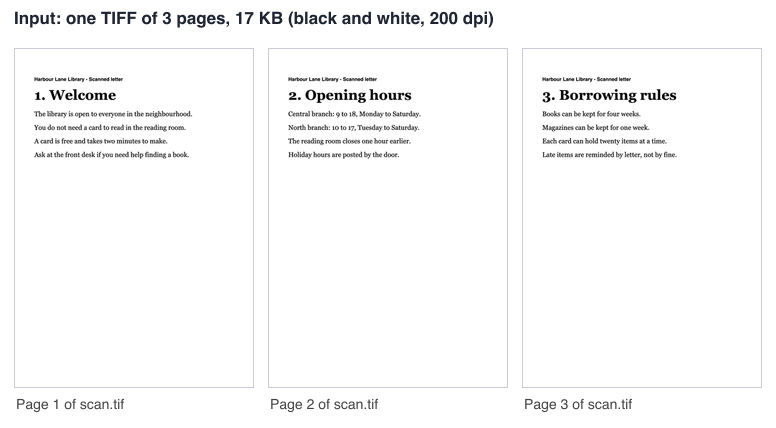
Input: one TIFF of 3 pages, 17 KB
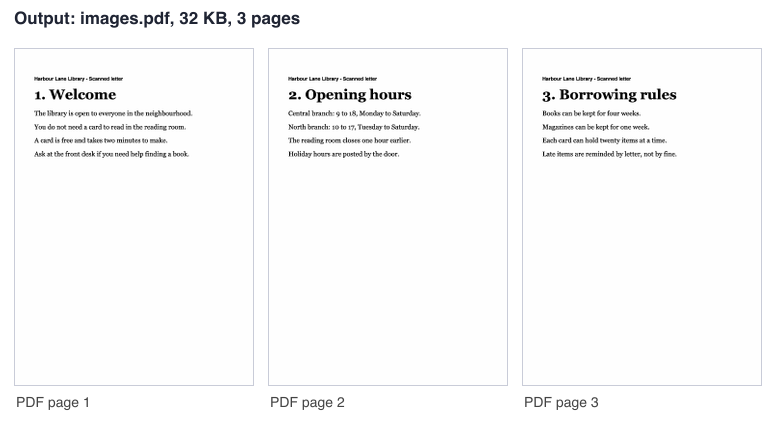
Output: images.pdf, 3 pages, 32 KB
How to convert TIFF to PDF
To convert TIFF to PDF, add your files, check their order, and start the job. You can do this without an account. The browser checks each file type before upload, and the server checks it again, because the type is read from the file content and not from the file name.
Wondering how to convert tiff to pdf? Add the files, set the options, convert and download; the steps above cover each part.
Multi-page TIFF: every page becomes a PDF page
Every page of a multi-page TIFF becomes one page of the PDF, in the order of the file. Thumbnail and mask sub-images stored inside a TIFF are not counted as pages. That is how a multi page tiff to pdf job works for a batch of scans saved as one file. Many scans use the .tif extension, so a tif to pdf job works the same way: the type is read from the file content, not from the name.
- In our test, a 3 page black-and-white TIFF gave a PDF of 3 A4 pages (generated test file).
- A TIFF with many pages is still one file in the list, but all its pages go into the PDF.
Mix TIFF, JPG and PNG and set the page order
You can add several files and mix TIFF, JPG and PNG files in one job. The list order is the page order. Drag a file or use the arrows to change it. This is the same image to PDF operation used by JPG to PDF and PNG to PDF, with TIFF files allowed.
In the file list, a TIFF shows its name and size but no thumbnail, because most browsers cannot draw TIFF files. The result panel shows a preview of the finished PDF.
Page size, orientation and margin
Page size has three choices. "Fit each image (no fixed size)" is the default. The page then takes the size of the picture, using the resolution stored in the TIFF. If the file has no resolution or an unusable one, 96 pixels per inch is used, as for JPG and PNG.
A4 and Letter center the picture and scale it to fit while keeping its shape. A small picture is enlarged and can look soft. For A4 and Letter you can choose orientation (automatic by default, portrait or landscape) and margin (none by default, small, medium or large). The TIFF orientation setting is applied, so a rotated or mirrored scan comes out upright.
Transparency, 16-bit and color profiles
Three limits apply to every TIFF conversion. Transparent areas become white, because they are placed on a white background. In our test, a half transparent red became pink on white. The result panel warns you when this happens.
16-bit pictures are used as 8-bit. Color profiles (ICC) are not applied. Check these limits before you convert important files.
Why a color TIFF can make a big PDF
A TIFF page is stored in the PDF without loss. A color TIFF that was compressed as JPEG can therefore give a PDF several times bigger than the TIFF. In one engine test, one color A4 page at 300 dpi (a generated test image) made a PDF of about 22 MB.
- In our test, a color LZW-compressed TIFF of 395 KB gave a 131 KB PDF with one A4 page. Results vary with the file.
- A large color scan hits the picture data limit first. Split a big color TIFF into several PDFs.
Scans: black and white and gray stay small
Black-and-white and gray scans stay small. In an engine test, 20 gray A4 pages gave a PDF of about 4 MB, and 20 black-and-white A4 pages gave one of about 86 KB. Our 3 page fax-style black-and-white TIFF (17 KB) gave a 32 KB PDF, so a PDF can be bigger than a TIFF that uses fax compression.
The pages in the PDF are pictures with no text. If you need to read a scan, use the Image to Text tool. We do not make searchable PDFs.
Limits: size, pages, pixels and credits
Each file has an upload size limit of 5 MB without an account and 10 MB signed in. All files together can be up to 20 MB without an account and 100 MB signed in. The number of pictures and TIFF pages in one job is limited to 20 without an account and 100 signed in. A job over the limit fails with a "too many pages" message and is never silently dropped.
Credits (signed in): 1 credit per job, plus 1 for each started 20 pages beyond the first 20, plus 1 for each started 20 MB of the result beyond the first 20 MB. A 20 page scan is 1 credit. Failed and timed-out jobs are refunded in full. Without an account, you can run 20 jobs per day per visitor.
- One TIFF page can be up to 25 MP.
- All TIFF pages in one job together can be up to 60 MP without an account and 120 MP signed in. A black-and-white page counts for 25% of its pixels.
- Picture data written into the PDF is limited to 40 MB without an account and 100 MB signed in.
- The web tool gives a signed-in job 60 seconds and an anonymous job 30 seconds.
Convert TIFF to PDF from code
The API takes one file per upload. First, send the raw file bytes to https://api.aiipworld.com/v1/uploads with Content-Type image/tiff, and keep the upload_id from the answer. Send each file in its own request. Then send a POST to https://api.aiipworld.com/v1/pdf-jobs with JSON that sets op to image_to_pdf, your params, and files as a list of upload ids in page order.
Poll GET /v1/jobs/:id until the job succeeds, fails or times out. The result has download_url, which is a short-lived signed link. Authorize with Authorization: Bearer <API key> or x-api-key. An upload can be used once and expires after 1 hour if it is not used. The page shows a ready cURL, Node and Python example below the tool, built from the settings you chose. The params are page_size, orientation and margin.
Possible errors are 400 invalid_params, 413 file_too_large, 422 unsupported_image, 404 upload_not_found, 402 insufficient_credits and 429 rate limited. A failed job can return error_codes such as too_many_pages and bad_params.
Privacy: what happens to your file
Your file is sent to our server, and the conversion is done there. You must have the right to use what you upload, as set out in our Acceptable Use Policy. The uploaded file is used only to make the result. The working copy of the upload is deleted as soon as the job ends, whether it succeeds or fails.
The result is deleted after 10 minutes in the free web tool. We keep no history, and download links are short-lived. Anonymous use needs a human check from Cloudflare Turnstile. Signed-in users skip that check and use credits. We add no watermark to your PDF.
Questions
Can I convert TIFF to PDF for free?
Yes. You can convert without an account, within the limit of 20 jobs per day per visitor. Signed-in jobs use credits.
Does a multi-page TIFF give a multi-page PDF?
Yes. Every page of the TIFF becomes one page of the PDF, in the order of the file.
Can I combine several TIFF files into one PDF?
Yes. Add the files to the list, and the list order sets the page order. The output is one PDF named images.pdf.
Can I mix TIFF with JPG or PNG?
Yes. TIFF, JPG and PNG files can be in one job, and the list order is the page order. A JPG without a stored resolution uses 96 pixels per inch.
Why is my PDF bigger than my TIFF?
A TIFF page is stored in the PDF without loss, so a color TIFF that was compressed as JPEG can give a much larger PDF. Black-and-white and gray scans usually stay small. Results vary with the file.
Why is the background of my transparent TIFF white?
Transparent areas are placed on a white background during conversion. The result panel warns you when this happens.
Does the PDF have searchable text?
No. The PDF is made of pictures with no text layer, and we do not make searchable PDFs. Use the Image to Text tool to read a scan.
What happens to a BigTIFF or a damaged file?
Both are refused. BigTIFF is not accepted, and a TIFF cut off in the middle fails with a message that the TIFF is damaged. Renaming a file does not help, because the type is read from the file content.
Does it keep the size of my scan, for example A4 at 300 dpi?
Yes, if the TIFF stores its resolution. With the default page size, the page takes the size of the picture using that resolution. Choose A4 or Letter for a fixed page size, and the picture is then scaled to fit.
Can I convert TIFF to PDF in my own code?
Yes. Upload the file with Content-Type image/tiff, then create an image_to_pdf job and poll it until it finishes. The API page has the steps and the error codes.
Need this in your app or in bulk?
This tool runs on the same platform as the API, so the same merge, split or rotate is two HTTP requests from your code: upload each PDF, then start the job. A free account includes 100 credits a month.