HTML email preview
This HTML email preview draws your email code in Chromium at the width you choose. You paste the HTML, pick a width and get a PNG to check the layout and colours. It is not a copy of how Gmail, Outlook or any other mail app will show your email.
- This is Chromium drawing your HTML at a width you choose. It is not Gmail, Outlook, Apple Mail or any other mail app, and it does not copy their rules.
- JavaScript is off in this tool. The tool does not send email, give a spam score or check whether links work.
- The free capture stops at 2000 px high. Anything lower than that height is not in the PNG.
This shows how headless Chromium draws your HTML at the width you pick. It does not copy Gmail, Outlook or any other mail app, which rewrite or limit HTML and CSS in their own ways. Send a test to the real inboxes you care about.
1.3 KB of 256 KB allowed in the free web tool.
The dark option sets the browser's dark colour scheme, so only CSS written for prefers-color-scheme changes. JavaScript is switched off. Remote images load from public addresses.
Complete the human check to enable the button.
Result
Your image will appear here.
The free web tool captures at most 2000px of height. For taller captures, use the API.
Retention: web-tool results are deleted after 10 minutes and no history is kept. API results are kept 1 day on the free plan and 7 days on Starter and Pro (30 days on Business).
No account needed
10 per minute and 50 per day for free.
Real browser rendering
Headless Chromium, the same engine as the API.
Deleted automatically
Web tool results are removed after 10 minutes.
Privacy: what you submit is used only to make this file. The working copy is deleted when the job ends, the result after 10 minutes. See the privacy policy.
Do this from your code
The same request, built from the input and options above. Create an account to get an API key.
curl -X POST https://api.aiipworld.com/v1/render \
  -H "Authorization: Bearer $AIIPWORLD_API_KEY" \
  -H "Content-Type: application/json" \
  -d '{"html":"","output":"pdf","options":{}}'

# returns {"job_id": "...", "status": "queued"}; then poll:
curl https://api.aiipworld.com/v1/jobs/JOB_ID -H "Authorization: Bearer $AIIPWORLD_API_KEY"
Batches
The web tool handles 1 document at a time. The API takes one request per document, so you can script as many as your plan allows.
More control
Whole-page capture (full_page), clipping to a region, request headers and a custom user agent are API options. See the docs.
Retention
Web-tool results are kept 10 minutes; free API results 1 day; Starter and Pro results 7 days; Business 30 days. The web tool allows 10 conversions per minute and 50 per day per visitor.
In one sentence
A free online tool that draws the HTML of an email in Chromium at a chosen width and saves it as a PNG, as a layout check and not a mail-client test.
Key facts
- Widths: 600, 375, 320 or 800 px, light or dark colour scheme, 1x or 2x density; JavaScript is off.
- Capture height 800 or 1200 px, or up to 2000 px in the free tool; signed-in users can capture the whole email from 2 credits.
- Does not emulate Gmail, Outlook or any mail app, and does not send email, check spam scores or test links.
- Free without an account: up to 10 conversions per minute and 50 per day per visitor, no watermark. Signed in, each render costs 1 credit (100 free credits every month).
- Files are deleted automatically: 10 minutes after conversion without an account, 1 day with a free account.
- Developers can run the same render with POST https://api.aiipworld.com/v1/render and an API key (see the screenshot API page).
How it works
- Paste the HTML of your email into the box. Include the CSS your email uses, either inline or in a style block.
- Choose a width: 600, 375, 320 or 800 px. Start with 600 px, then check 375 px or 320 px for narrow phone screens.
- Choose the light or dark colour scheme, and 1x or 2x pixel density. Use 2x to look at small text and thin borders more closely.
- Set the capture height: 800, 1200 or 2000 px. Anonymous use needs a quick human check before the preview runs.
- Run the preview and download the PNG. Save it if you want to keep it, because results are deleted after 10 minutes.
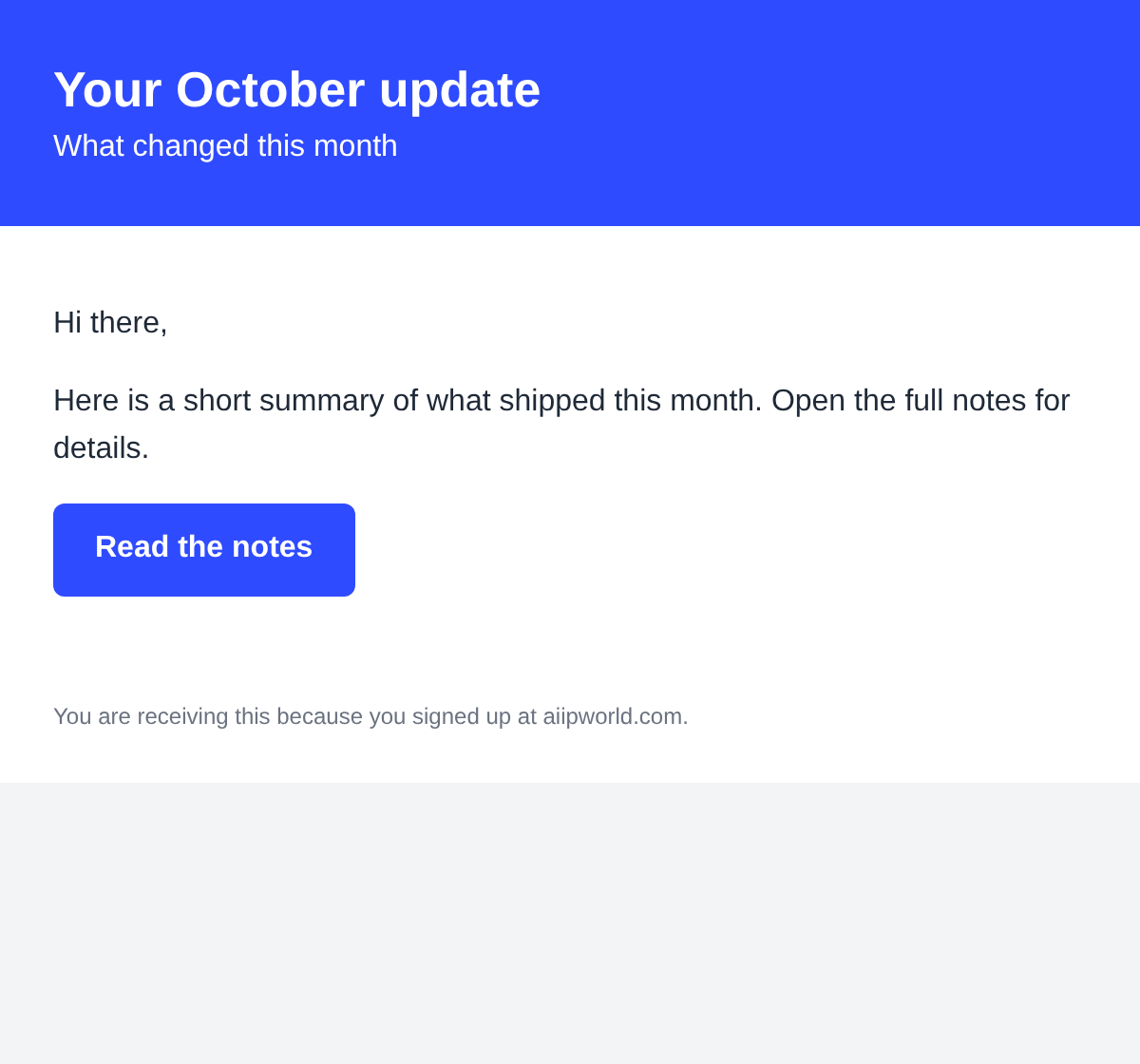
Example output
How to preview an HTML email
An HTML email preview shows your email code the way a browser draws it. You paste the HTML, the tool renders it in Chromium at the width you pick, and you get a PNG back.
Use it while you build or edit an email. Change the code, run the preview again, and compare the images at each width. Look at both colour schemes before you move on.
Anonymous use needs a human check. Signed-in users skip the check and use credits.
What this preview shows and what it does not
The preview shows what Chromium draws from your HTML and CSS at the width you set. You can check layout, type, colours, spacing and images as a browser renders them.
It does not show how Gmail, Outlook, Apple Mail or any other mail app displays your email. Some mail apps rewrite styles, remove some CSS, block images and apply their own dark mode. None of that happens here.
The preview is a rendering check only. For delivery, send a test message to a few real inboxes yourself, and check every link by hand.
- Draws your HTML in Chromium at a width you choose.
- Shows the light or dark colour scheme as the browser sees it.
- Does not emulate Gmail, Outlook or any other mail app.
- Does not send email, check spam or check links.
Widths and phone view
Set 600 px first to check the main layout. Then set 375 px or 320 px to see how the email behaves on narrow phone screens. Use 800 px to check a wider layout.
The width setting changes the space your HTML has to fit into. It is not a device emulator, so it does not copy a phone's browser.
Check that tables and images shrink or stack as you expect. A fixed-width table wider than the width you chose will run past the edge of the image.
Dark colour scheme
Choose the dark colour scheme to render the email with the browser's dark preference switched on. Only CSS written for dark mode changes, meaning rules inside a prefers-color-scheme: dark block.
If your email has no dark rules, the dark preview looks the same as the light one. Add dark rules first, then check both schemes.
The tool does not rewrite colours the way some mail apps do. A colour that looks right here can look different in a real inbox, so send a test to see it.
Images, fonts and links
Remote images load from public http:// and https:// addresses. Images on private or local addresses, such as localhost, are blocked. A path that exists only on your computer will not load, so use full image addresses.
The render server has its own fonts, including Liberation Sans, Liberation Serif, Noto Sans and Noto Serif. Arial and Helvetica map to Liberation Sans, and Times New Roman maps to Liberation Serif. Fonts on your own computer are not there.
To use another font, load it with @font-face from a public URL or a data URL.
The tool does not check whether your links work. Test each link by hand.
A checklist before you send
Work through this list before you send the email to anyone. It covers what the preview can show; the rest needs a real send.
- Preview at 600, 375 and 320 px, and check that nothing runs past the edge.
- Check the dark colour scheme as well as the light one.
- Confirm that every image uses an https:// address and loads.
- Read the body text at 1x and at 2x, and check that it is easy to read.
- Check each link by hand, including the one that leads to your website.
- Send a test to a few real inboxes, and look at the email in the apps your readers use.
Capturing a whole email
The free tool captures a window from the top, up to 2000 px high. Long emails need the larger capture height, or a full-page capture.
Signed-in users can capture the whole email with a real full-page capture. It costs from 2 credits and is capped at 16,384 px tall. Taller pages are cut, and the result says so.
HTML email preview from code
You can run the same rendering from your own code. Send a POST request to /v1/render with the screenshot operation, your email in the html field, the viewport width and color_scheme. The API answers with 202 and a job_id.
Poll GET /v1/jobs/:id until the status is succeeded, failed or timeout, then download the PNG from download_url. The link is short-lived, so download the file soon after the job succeeds. Credits for failed and timed-out jobs are returned.
Webhooks are not available yet, so polling is the only way to learn when a job finishes. There is no batch endpoint, so send one request per email.
The API runs JavaScript by default. Set javascript to false to match the tool, which keeps scripts off. Authenticate with your API key as a Bearer token. Each simple render costs 1 credit.
Using an email preview tool while you build
An email preview tool fits well into the build step. Make one change, run the preview at 600 px, and look at the PNG before you change anything else.
Keep a copy of each PNG if you want to compare versions. Results are deleted after 10 minutes, so save the file yourself.
Each email html preview is one view of your code at one width, not a verdict on how the message looks in every app. Use several widths and both colour schemes before you decide the layout is ready.
Questions
Does this show how Gmail or Outlook will display my email?
No. The preview draws your HTML in Chromium at the width you choose. It does not copy Gmail, Outlook, Apple Mail or any other mail app, and it does not apply their rules or their dark mode. Send a test to real inboxes to see how each app shows your email.
How do I preview an HTML email at phone width?
Choose 375 px or 320 px as the width before you run the preview. Compare that PNG with the 600 px version to see what changes. The width setting is not a phone emulator.
Can I preview dark mode?
Yes. Choose the dark colour scheme and the browser's dark preference is switched on. Only CSS written for dark mode changes, so the tool does not rewrite your colours.
Why are my images missing?
Images must load from public http:// or https:// addresses. Images on localhost or other private addresses are blocked, and a path that exists only on your computer will not load. Open the image address in a browser to check that it works.
Do scripts run?
No. JavaScript is off in this tool. The API runs JavaScript by default, so set javascript to false there if you want the same result.
Can I send a test email from here?
No. The tool only makes a PNG of your HTML and does not send email. Send a test to your own inboxes from your email service.
Does it check spam or links?
No. The tool does not give a spam score and does not check whether links work. Check your links by hand before you send.
Can I capture the whole email?
The free tool captures up to 2000 px high. Signed-in users can capture the whole email with a full-page capture, which costs from 2 credits and is capped at 16,384 px tall.
How long are results kept?
Results are deleted after 10 minutes. No history is kept, so save the PNG when the preview is ready.
Do I need an account?
No. Anonymous use is free and needs a human check. Signed-in users skip the check and use credits.
Does the PNG have a watermark?
No. We add no watermark to the output of the free tool.
Why does my preview look cut off?
The capture height limits the image. Choose a larger capture height, up to 2000 px in the free tool, or use a signed-in full-page capture for the whole email.
Is this a full email tester?
No. It is a quick way to check layout, not a full html email tester. The preview draws your code in Chromium at the width you choose, so you can see spacing, type and colours. It does not show how Gmail, Outlook or another mail app displays the message, and it does not send anything.
Should I check the email in real inboxes too?
Yes. Use the preview to catch layout problems early, then send a test HTML email to a few inboxes you control. Mail apps rewrite styles and block images in their own ways, and only a real send shows what your readers will see.
Need this in your app or in bulk?
This tool runs on the render API, so the same image is one HTTP request from your code. A free account includes 100 credits a month.