
Reorder PDF Pages
Reorder PDF Pages with a free tool that puts the pages of one PDF in the order you type. You get a new PDF with the same pages, and your original file is not changed. The tool shows page numbers, not page pictures, so open your PDF in a viewer first to see which page is which.
- The tool shows page numbers, not page pictures. Look at your PDF in a viewer to see which page is which.
- Every page must appear exactly once. To remove pages, use the Delete PDF Pages tool.
- Encrypted PDFs are refused. No password is accepted.
Drop a file here or choose one. Up to 10 MB per file without an account.
Enter the number of pages in your PDF (2 to 100). The tool checks your order against it before anything is uploaded; the server checks it again.
List every page once, in the order you want, for example 3,1,2,4-z. Ranges can count up or down (5-3 means 5,4,3), z is the last page and r2 the second from last.
Complete the human check to enable the button.
Result
Your PDF will appear here.
Without an account: 20 jobs per day, up to 10 MB per file, 100 pages. Signed in: up to 50 MB per file, 500 pages.
Retention: web-tool results are deleted after 10 minutes and no history is kept. API results are kept 1 day on the free plan and 7 days on Starter and Pro (30 days on Business and Scale).
No account needed
20 PDF jobs per day per visitor.
Pages are not re-drawn
The pages are copied or turned as they are, with no re-encoding, so text and images keep their quality.
Deleted automatically
Web tool results are removed after 10 minutes.
Privacy: what you submit is used only to make this file. The working copy is deleted when the job ends, the result after 10 minutes. See the privacy policy.
Do this from your code
The same job as API requests: upload each PDF, start the job with the upload ids, then poll it. It needs an API key; a free account can create one.
curl -X POST "https://api.aiipworld.com/v1/uploads" \
  -H "Authorization: Bearer $AIIPWORLD_API_KEY" \
  -H "Content-Type: application/pdf" \
  --data-binary @input.pdf   # returns {"upload_id": "UPLOAD_ID_1", ...}

curl -X POST "https://api.aiipworld.com/v1/pdf-jobs" \
  -H "Authorization: Bearer $AIIPWORLD_API_KEY" \
  -H "Content-Type: application/json" \
  -d '{"op":"pdf_reorder","params":{"order":""},"files":["UPLOAD_ID_1"]}'
# returns {"job_id": "...", "status": "queued"}; then poll:
curl https://api.aiipworld.com/v1/jobs/JOB_ID -H "Authorization: Bearer $AIIPWORLD_API_KEY"
Batches
The web tool works on one PDF at a time. Use the API for many files; each job takes one PDF.
Retention
Web-tool results are kept 10 minutes; free API results 1 day; Starter and Pro results 7 days; Business and Scale 30 days.
In one sentence
A free online tool that puts the pages of one PDF in a new order that you type (for example 3,1,2,4-z) or set with numbered boxes, moving the pages without redrawing them; every page must appear exactly once.
Key facts
- Input: one PDF up to 10 MB without an account (50 MB signed in), up to 100 pages (500 signed in); encrypted PDFs are refused.
- The tool shows page numbers, not page pictures. You type the number of pages and the new order (numbers, ranges that can count down such as 5-3, z for the last page, r2 for the second from last); the tool checks before the upload that every page appears exactly once.
- To leave pages out use the delete pages tool; to repeat a page use the split tool in the mode that keeps the pages you type.
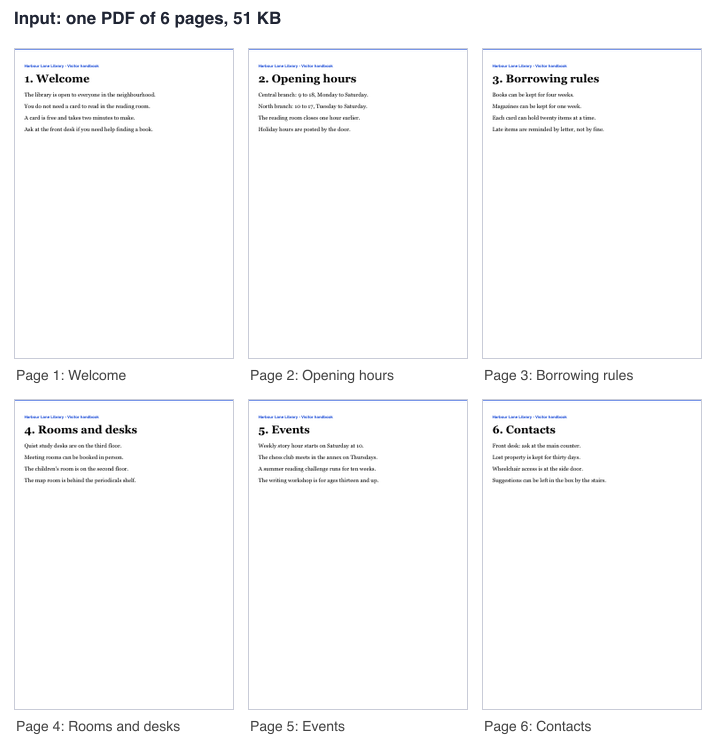
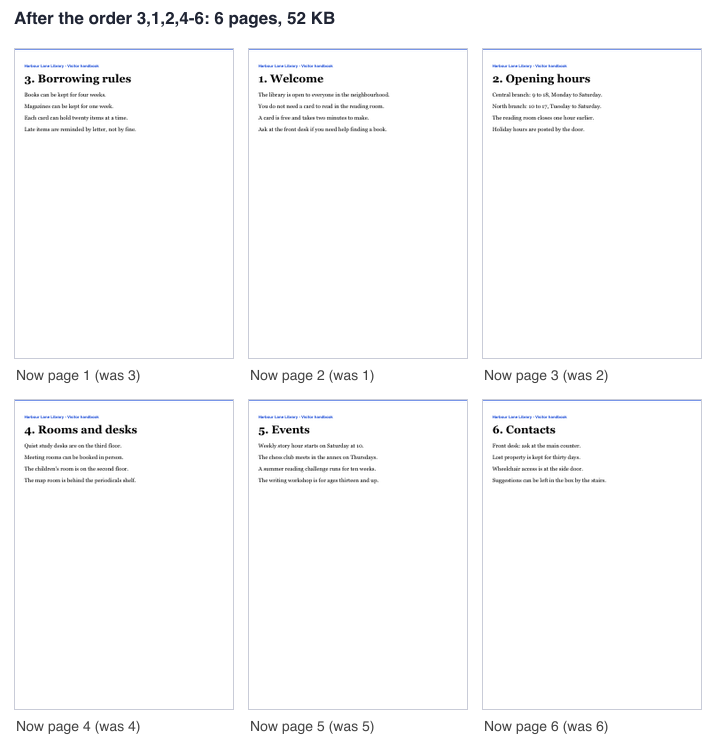
- In our test the order 3,1,2,4-6 on a generated 6 page PDF of 51 KB gave a PDF of 6 pages and 52 KB with the pages in that order; results vary with the file.
- API: POST the PDF to https://api.aiipworld.com/v1/uploads, then POST https://api.aiipworld.com/v1/pdf-jobs with op pdf_reorder, the param order and the upload id, and poll GET /v1/jobs/:id.
- Free without an account: 20 PDF jobs per day per visitor, no watermark. Signed in, each job costs 1 credit, plus 1 credit for each started 20 MB of result beyond the first 20 MB (100 free credits every month).
- Files are deleted automatically: 10 minutes after conversion without an account, 1 day with a free account.
How it works
- Choose your PDF. Open it in a viewer to see which page is which.
- Enter the number of pages in "Pages in your PDF".
- Type the new order in "New page order", or drag the numbered boxes into place.
- Fix any message about a missing page, a repeated page or a page past the end. The tool checks this before it uploads.
- Click the button and download reordered.pdf.
Example output
Input: one PDF of 6 pages, 51 KB
New order 3,1,2,4-6: 6 pages, 52 KB
How to reorder PDF pages
To reorder PDF pages or rearrange PDF pages here, you type the new order of the page numbers. The tool does not draw thumbnails of your pages, because the browser does not read your PDF. Your file is sent to our server, and the server moves the pages. To see which page is which, open your PDF in a viewer before you start. The steps below show how to reorder pages in PDF files with the web tool.
The result is a new PDF with the same pages. The pages are moved, not redrawn, so text, fonts and images are not changed. The result panel says how many pages changed place.
- Download name: reordered.pdf
- Cost: 1 credit for signed-in users, plus the size rule shown in the limits section
Type the new Page order
For a pdf reorder, type the order as numbers, separated by commas. You can use ranges such as 2-4, z for the last page, and rK for the K-th page from the end, where r1 is the last page. For example, 3,1,2,4-z moves page 3 to the front.
Ranges can also count down. The order 5-3 means 5, 4, 3. The order text can be up to 4000 characters and 1000 items.
In one test, we typed 3,1,2,4-6 for a generated 6 page PDF of 51 KB. The result was a PDF of 6 pages and 52 KB, and the text showed the pages in the order 3, 1, 2, 4, 5, 6. Results vary with the file.
Move pages with the numbered boxes
When the order is complete, the tool shows your pages as small numbered boxes, up to 100 pages. Drag a box or use the left and right arrow buttons to move it. The boxes edit the same order text, so you can switch between them freely.
The boxes show up to 100 pages. With more pages, type the order.
Reverse the pages or start again
Use the "Reverse all pages" button, or type z-1 to reverse the whole document. Use the "Reset to 1, 2, 3 ..." button to return to the original order.
The result panel says how many pages changed place. In our test, the order z-1 on a 6 page PDF gave the order 6, 5, 4, 3, 2, 1, and all 6 pages changed place. If the order you give is the original order, the panel says the pages stayed as they were.
Every Page exactly once
Every page must appear exactly once in the new order. The tool refuses the job before upload if a page is missing, listed twice, or past the end of the document. The message tells you which pages are missing or repeated.
For example, "Missing pages: 4, 5, 6. Every page must appear exactly once." In our tests, the orders 1,2,3 (missing 4, 5, 6), 1,1,2,3,4,5,6 (page 1 twice) and 1,2,3,4,5,6,7 (page 7 does not exist) were all refused and gave no file. The server gives the same checks if you send an order through the API.
Leave pages out or repeat a Page
This tool keeps every page. To leave pages out, use the Delete PDF Pages tool. To repeat a page, use the Split PDF tool in its mode that keeps the pages you type, where a page can be repeated.
You can rearrange pages in PDF files with this tool, but reordering alone cannot remove or duplicate a page.
Limits: size, pages and credits
Free web tool: 20 jobs per day per visitor across the PDF tools. Without an account, each uploaded file has its own human check and counts toward 40 uploads per day per visitor.
PDF in: up to 10 MB without an account and 50 MB signed in. Up to 100 pages without an account and 500 pages signed in.
- Signed-in credits: 1 credit per job, plus 1 credit for each started 20 MB of the result beyond the first 20 MB.
- Failed and timed-out jobs are refunded in full.
- Time limit: 60 seconds for a signed-in job and 30 seconds for an anonymous job.
Encrypted and damaged files
Encrypted PDFs are refused. This includes files that are password protected or have permission restrictions, at any strength. No password is accepted, and no attempt is made to open or break the protection.
A slightly damaged PDF is repaired automatically when possible. The result panel says so: "The file had minor damage that was repaired automatically." The setting "Repair a slightly damaged PDF automatically" is on by default. With it off, a damaged file is refused.
Reorder PDF pages from code
Upload the file first. POST the raw bytes to https://api.aiipworld.com/v1/uploads with Content-Type application/pdf, one file per request. The answer has an upload_id.
Then POST to https://api.aiipworld.com/v1/pdf-jobs with JSON that includes op pdf_reorder, the param order, and files set to the upload_id. Poll GET /v1/jobs/:id until the job succeeds, fails or times out. The download_url is a short-lived signed link. Use the Authorization header with Bearer and your API key, or x-api-key.
The result includes pages_in, pages_out, moved and unchanged. The page shows a ready cURL, Node and Python example built from your settings. Errors include missing_pages, duplicate_page and page_out_of_range. See /docs/ for the general API.
Privacy: what happens to your file
Your file is sent to our server. You must have the right to use what you upload, as set out in the Acceptable Use Policy. The uploaded file is used only to make the result.
The working copy of the upload is deleted as soon as the job ends, whether it succeeds or fails. In the free web tool, the result is deleted after 10 minutes, and no history is kept. Download links are short-lived. The result panel shows how long your result is kept.
Questions
Can I reorder PDF pages for free?
Yes, you can reorder PDF pages for free in the web tool without signing in. Anonymous use needs a human check, and it counts toward 20 jobs per day per visitor.
How do I move one page to the front?
Type the new order with that page first. For page 3 of a 6-page file, type 3,1,2,4-z.
How do I reverse the order of all pages?
Type z-1 in the order box, or click "Reverse all pages". Both give the same result.
Why must I type the number of pages?
The number lets the tool check your order before anything is uploaded. The server checks the order again after upload.
Why does the tool say pages are missing?
Every page must appear exactly once in the new order. The message names the pages that are missing, so add them or use the Delete PDF Pages tool to remove them.
Can I leave out or repeat pages?
Reordering keeps every page exactly once. Use the Delete PDF Pages tool to leave pages out, or the Split PDF tool to repeat a page.
Does reordering reduce the quality?
Reordering moves pages without redrawing them, so text, fonts and images are not changed. Results vary with the file.
Does the original file change?
No. The original file is not changed, and the new PDF is named reordered.pdf.
Can I reorder pages in a password-protected PDF?
No. Encrypted PDFs are refused, and no password is accepted.
Can I reorder PDF pages in my own code?
Yes. Use the API with the pdf_reorder operation. The page shows a ready cURL, Node and Python example built from your settings.
Need this in your app or in bulk?
This tool runs on the same platform as the API, so the same merge, split or rotate is two HTTP requests from your code: upload each PDF, then start the job. A free account includes 100 credits a month.