
Rotate PDF Online for Free
Rotate PDF pages online for free, with no signup. Use it to rotate PDF file pages that came out sideways, or to turn PDF pages upside down. Choose whether to turn all pages or only some, pick 90, 180 or 270 degrees, and download a new PDF. Your original file is not changed, and the page content stays as it was.
- Results vary by file. The measurements on this page were made on generated test files, not real documents.
- Encrypted PDFs are refused. No password is accepted.
- Rotation is a display setting stored in the file. We have not tested other viewers, so check the result in the viewer you plan to use.
Drop a file here or choose one. Up to 10 MB per file without an account.
The turn is added to the page's current rotation.
Complete the human check to enable the button.
Result
Your PDF will appear here.
Without an account: 20 jobs per day, up to 10 MB per file, 100 pages. Signed in: up to 50 MB per file, 500 pages.
Retention: web-tool results are deleted after 10 minutes and no history is kept. API results are kept 1 day on the free plan and 7 days on Starter and Pro (30 days on Business and Scale).
No account needed
20 PDF jobs per day per visitor.
Pages are not re-drawn
The pages are copied or turned as they are, with no re-encoding, so text and images keep their quality.
Deleted automatically
Web tool results are removed after 10 minutes.
Privacy: what you submit is used only to make this file. The working copy is deleted when the job ends, the result after 10 minutes. See the privacy policy.
Do this from your code
The same job as API requests: upload each PDF, start the job with the upload ids, then poll it. It needs an API key; a free account can create one.
curl -X POST "https://api.aiipworld.com/v1/uploads" \
  -H "Authorization: Bearer $AIIPWORLD_API_KEY" \
  -H "Content-Type: application/pdf" \
  --data-binary @input.pdf   # returns {"upload_id": "UPLOAD_ID_1", ...}

curl -X POST "https://api.aiipworld.com/v1/pdf-jobs" \
  -H "Authorization: Bearer $AIIPWORLD_API_KEY" \
  -H "Content-Type: application/json" \
  -d '{"op":"pdf_rotate","params":{"rotation":90},"files":["UPLOAD_ID_1"]}'
# returns {"job_id": "...", "status": "queued"}; then poll:
curl https://api.aiipworld.com/v1/jobs/JOB_ID -H "Authorization: Bearer $AIIPWORLD_API_KEY"
Batches
The web tool works on one PDF at a time. Use the API for many files; each job takes one PDF.
Retention
Web-tool results are kept 10 minutes; free API results 1 day; Starter and Pro results 7 days; Business and Scale 30 days.
In one sentence
A free online tool that turns all pages or chosen pages of a PDF by 90, 180 or 270 degrees by changing each page's rotation setting, without re-encoding the page content.
Key facts
- Input: one PDF, up to 10 MB and 100 pages without an account (50 MB and 500 pages signed in); the type is read from the file content.
- Settings: 90 degrees clockwise, 180 degrees or 90 degrees counterclockwise (rotation 270 in the API), for all pages or for the pages and ranges you type; the turn is added to the page's current rotation.
- Only the rotation setting of each page changes. In our test a generated 2-page PDF of 46 KB turned 90 degrees clockwise stayed 46 KB with both pages reporting rotation 90.
- Encrypted PDFs are refused and are never opened or broken; a slightly damaged PDF is repaired automatically and the result panel says so, unless repair is turned off.
- API: POST the PDF to https://api.aiipworld.com/v1/uploads, then POST https://api.aiipworld.com/v1/pdf-jobs with op pdf_rotate, rotation and optional pages, and poll GET /v1/jobs/:id.
- Free without an account: 20 PDF jobs per day per visitor, no watermark. Signed in, each job costs 1 credit plus 1 credit for each started 20 MB of result beyond the first 20 MB (100 free credits every month).
- Files are deleted automatically: 10 minutes after conversion without an account, 1 day with a free account.
How it works
- Upload one PDF. The tool handles one file at a time.
- Open the "Turn pages" list and choose 90 degrees clockwise, 180 degrees, or 90 degrees counterclockwise.
- In "Pages", leave the field empty to turn all pages, or type page numbers and ranges such as 2,4-6.
- Click "Rotate PDF".
- Check the preview and the "Turned N pages" line, then click Download PDF to get rotated.pdf.
Example output
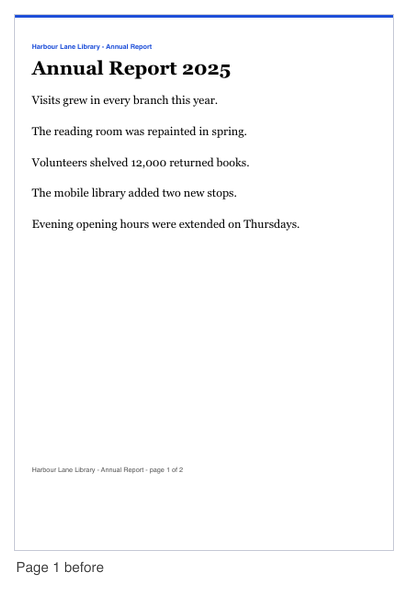
Page 1 before
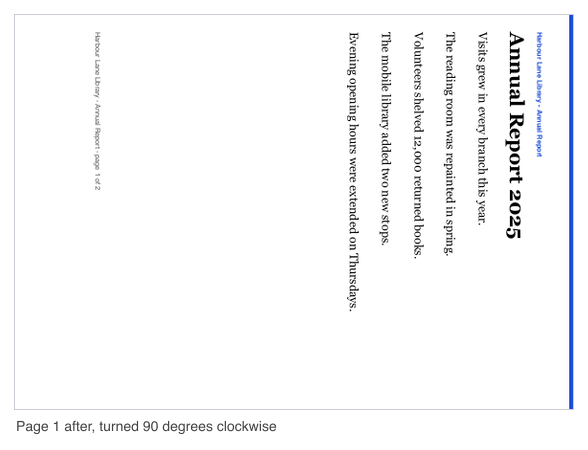
Page 1 after, 90 degrees clockwise
How to rotate a PDF
To rotate a PDF, upload the file, choose a turn, and run the job. The tool works on one PDF at a time, so a set of files needs one job per file. The new file is named rotated.pdf and is ready to download when the job ends.
Before the turn is applied, the tool checks that the file is a real PDF. Results can differ by file, so always look at the preview before you download.
Rotate PDF pages: all pages or some pages
Leave the "Pages" field empty to rotate every page in the file. To rotate only some pages, type their numbers or ranges, such as 2,4-6. Page numbers start at 1, z means the last page, and r2 means the second page from the end.
- Use commas to separate items, for example 1-3,5.
- A number past the last page makes the job fail, and the credits are returned.
- Zero is not a valid page number.
Choose 90, 180 or 270 degrees
The "Turn pages" list has three choices. 90 degrees clockwise turns a page a quarter turn to the right. 180 degrees turns it upside down. 90 degrees counterclockwise turns it a quarter turn to the left.
In the API, the counterclockwise turn is written as rotation 270. Use 180 when a page is upside down, such as a scan that was stored the wrong way round. The tool does not detect the direction of a page by itself, so you choose the turn.
The turn is added to the current rotation
A turn is relative. It is added to whatever rotation the page already has. A page that is already turned 90 degrees and is turned 90 degrees again ends up at 180 degrees.
This matters when a file was rotated before. Look at the page in your PDF viewer before you choose a turn, so you do not add a turn that undoes the one you wanted.
Rotating changes how the page is shown, not the page itself
The tool only changes the rotation setting of each page. The page content, fonts and images are not changed or re-encoded. In our generated test, a 2 page PDF of 46 KB was turned 90 degrees clockwise. The result was a 2 page PDF of 46 KB, and each page reported rotation 90 when checked with pdfinfo.
In the same test, turning only page 2 by 180 degrees left page 1 at 0 degrees and set page 2 to 180 degrees. The thumbnail comparison on the page shows page 1 before and after a 90 degree clockwise turn. The setting is written into the new file you download. The original file is not changed.
Limits: size and pages
Without an account, a file can be up to 10 MB and have up to 100 pages. Signed in, a file can be up to 50 MB and have up to 500 pages. The free web tool allows 20 jobs per day per visitor.
Signed-in jobs use credits. Each PDF job costs 1 credit, plus 1 credit for each started 20 MB of the result beyond the first 20 MB. Failed and timed-out jobs are refunded in full. Prices are provisional. A result can be up to 200 MB.
Encrypted and damaged files
Encrypted PDFs are refused. This includes files with a password or with permission restrictions, whatever the strength of the protection. No password is accepted, and no attempt is made to open or break the protection.
A damaged PDF is repaired automatically when possible. The result panel then says "The file had minor damage that was repaired automatically". The repair setting "Repair a slightly damaged PDF automatically" is on by default. If you turn it off, a damaged file is refused. A file that cannot be repaired is also refused.
The tool reads the file type from the first bytes of the file, not from its name. A renamed file is treated as the type it really is. The file must begin like a PDF, with the marker %PDF- within the first 1024 bytes.
What to check in the result
The result panel shows the page count, the size and the credits reserved, and it says when a file had to be repaired. Pages in and pages out should match, and the preview should show the turn you chose. If they do not, do not use the file without checking it.
If your PDF has bookmarks, links, form fields, tags or metadata, check them in the result. We have not tested whether these are kept, so do not assume they are.
Rotate a PDF from code
Send an API request to rotate a PDF. First, upload each PDF with a POST to https://api.aiipworld.com/v1/uploads. Send the raw file bytes with Content-Type application/pdf, one file per request. The answer contains an upload_id. An upload can be used once, belongs to the account that made it, and expires after 1 hour if it is not used.
Then send a POST to https://api.aiipworld.com/v1/pdf-jobs with JSON that has op set to pdf_rotate, params with rotation set to 90, 180 or 270, and an optional pages value, and files set to a list with your upload_id. Authenticate with Authorization: Bearer <API key> or x-api-key. Poll GET /v1/jobs/:id until the job succeeds, fails or times out. Common parameters are allow_repair (default true) and linearize (default false).
If a request fails, the error codes are 400 invalid_params, 413 file_too_large, 422 not_a_pdf, 404 upload_not_found, 402 insufficient_credits and 429 rate limited. A failed job can report error_code values such as encrypted_pdf, corrupt_pdf, too_many_pages and page_out_of_range. The page shows a ready cURL, Node and Python example below the tool, built from the settings you choose. For the general API, see /docs/.
Privacy: what happens to your file
Your file is sent to our server. Nothing is processed in your browser. The file is used only to make the result. You must have the right to use what you upload, as set out in the Acceptable Use Policy.
The working copy of your upload is deleted as soon as the job ends, whether it succeeds or fails. In the free web tool, the result is deleted after 10 minutes. No history is kept, and download links are short-lived. The result panel shows how long your result is kept.
Questions
Can I rotate a PDF for free?
Yes. Anonymous use is free and needs only a human check (Cloudflare Turnstile). Each visitor can run up to 20 PDF jobs per day in the free web tool, and signed-in users use credits instead.
How do I rotate only one page of a PDF?
Type the page number in the "Pages" field, such as 4, and then run the job. Pages you leave out keep their current rotation. You can also type ranges such as 2,4-6.
Which way does 90 degrees turn?
90 degrees turns the page clockwise, a quarter turn to the right. For a quarter turn to the left, choose 90 degrees counterclockwise, which is rotation 270 in the API.
Does rotating reduce the quality?
No. The tool does not re-encode the pages, so text, fonts and images keep their quality. Only the page's rotation setting changes.
Can I rotate a PDF that has a password?
No. Encrypted PDFs are refused, and no password is accepted. The tool does not try to open or break the protection.
Can I rotate a scanned PDF that is upside down?
Yes, a scan stored upside down can be fixed with a 180 degree turn. The tool does not detect the direction itself, so check the preview before you download.
How do I rotate a PDF permanently?
Download the new file, rotated.pdf. The turn is written into that file. The original file is not changed.
Why did my second rotation undo the first one?
Each turn is added to the page's current rotation, so two 180 degree turns bring a page back to where it started. Check how the page looks in your PDF viewer before you choose a turn.
How many pages can I rotate?
Without an account, a file can have up to 100 pages. Signed in, the limit is 500 pages.
Can I rotate a PDF in my own code?
Yes. Upload the file to https://api.aiipworld.com/v1/uploads, then start a pdf_rotate job at https://api.aiipworld.com/v1/pdf-jobs, and poll GET /v1/jobs/:id for the result. The page shows ready cURL, Node and Python examples.
Need this in your app or in bulk?
This tool runs on the same platform as the API, so the same merge, split or rotate is two HTTP requests from your code: upload each PDF, then start the job. A free account includes 100 credits a month.