
Crop PDF Online, Free
Crop PDF is a free online tool that sets the visible area of each page in a PDF. Cropping hides the outside of the crop; it does not delete it, so it is not a way to remove private or sensitive content. Use it to trim margins or to keep one part of a page, then check the result panel.
- Cropping hides content and does not delete it. The cropped-away parts are still inside the file.
- There is no preview before you run the tool. Type the numbers, run the job and check the result panel.
- Encrypted (password-protected) PDFs are refused.
Drop a file here or choose one. Up to 10 MB per file without an account.
Cropping hides, it does not delete. The parts outside the crop stay inside the file, so do not use this tool to remove private or sensitive content. There is no preview before you run it.
The same amount is applied to every chosen page. A PDF with pages of different sizes needs percent, or run the tool for each size with the Pages field.
Cut off from each edge of the page as you see it
Empty counts as 0. At least one margin must be above 0.
Type numbers or ranges such as 1-3,5; z is the last page.
PDF programs show and print the crop box. Use the second choice only if a program ignores it. The cropped-away content stays in the file either way.
If the crop does not fit on one page, the whole job fails and nothing is made. The message names the page.
Complete the human check to enable the button.
Result
Your PDF will appear here.
Without an account: 20 jobs per day, up to 10 MB per file, 100 pages. Signed in: up to 50 MB per file, 500 pages.
Retention: web-tool results are deleted after 10 minutes and no history is kept. API results are kept 1 day on the free plan and 7 days on Starter and Pro (30 days on Business and Scale).
No account needed
20 PDF jobs per day per visitor.
Hidden, not deleted
The crop only sets the visible area. The pages are not re-drawn, and the cropped-away content stays in the file.
Deleted automatically
Web tool results are removed after 10 minutes.
Privacy: what you submit is used only to make this file. The working copy is deleted when the job ends, the result after 10 minutes. See the privacy policy.
Do this from your code
The same job as API requests: upload each PDF, start the job with the upload ids, then poll it. It needs an API key; a free account can create one.
curl -X POST "https://api.aiipworld.com/v1/uploads" \
  -H "Authorization: Bearer $AIIPWORLD_API_KEY" \
  -H "Content-Type: application/pdf" \
  --data-binary @input.pdf   # returns {"upload_id": "UPLOAD_ID_1", ...}

curl -X POST "https://api.aiipworld.com/v1/pdf-jobs" \
  -H "Authorization: Bearer $AIIPWORLD_API_KEY" \
  -H "Content-Type: application/json" \
  -d '{"op":"pdf_crop","params":{"margins":{"top":10,"right":10,"bottom":10,"left":10}},"files":["UPLOAD_ID_1"]}'
# returns {"job_id": "...", "status": "queued"}; then poll:
curl https://api.aiipworld.com/v1/jobs/JOB_ID -H "Authorization: Bearer $AIIPWORLD_API_KEY"
Batches
The web tool works on one PDF at a time. Use the API for many files; each job takes one PDF.
Retention
Web-tool results are kept 10 minutes; free API results 1 day; Starter and Pro results 7 days; Business and Scale 30 days.
In one sentence
A free online tool that crops the pages of a PDF by cutting margins or keeping a rectangle, in millimeters, points, inches or percent; it hides the outside of the crop and does not delete it, so it is not redaction.
Key facts
- Input: one PDF up to 10 MB without an account (50 MB signed in), up to 100 pages (500 signed in); encrypted PDFs are refused.
- Settings: cut margins (top, right, bottom, left) or keep a rectangle (x, y, width, height from the top-left corner), the unit (mm, pt, inches or percent), the pages to crop and whether to also change the page size; the result is cropped.pdf with the same number of pages.
- Cropping sets the visible area (the CropBox) and keeps everything outside it in the file, so it is not a way to remove private or sensitive content; the pages are not redrawn and the file size stays about the same.
- In our test a generated 6 page A4 PDF of 51 KB cropped with margins of 22, 5, 130 and 5 mm gave a 41 KB PDF with 6 pages of 566.6 x 411.1 pt, and the hidden header line was still in the file text; results vary with the file.
- API: POST the PDF to https://api.aiipworld.com/v1/uploads, then POST https://api.aiipworld.com/v1/pdf-jobs with op pdf_crop, margins or rect and the upload id, and poll GET /v1/jobs/:id.
- Free without an account: 20 PDF jobs per day per visitor, no watermark. Signed in, each job costs 1 credit, plus 1 credit for each started 20 MB of result beyond the first 20 MB (100 free credits every month).
- Files are deleted automatically: 10 minutes after conversion without an account, 1 day with a free account.
How it works
- Upload your PDF. Check that you have the right to use the file.
- Choose "Cut margins" and type the top, right, bottom and left amounts, or choose "Keep a rectangle" and enter x, y, width and height.
- Pick a unit: millimeters, points, inches or percent.
- Leave Pages empty for all pages, or type a range such as 1-3,5.
- Run the job and open the result panel to check the preview.
Example output
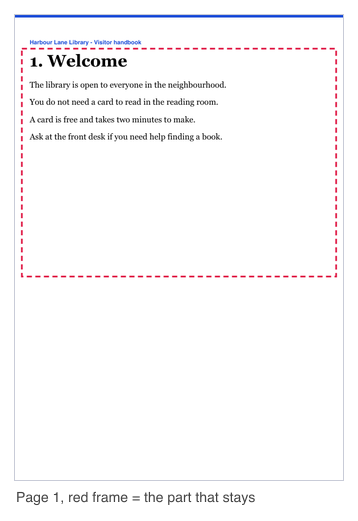
Input: one PDF of 6 pages, 51 KB (page 1 shown, the red frame is the part that stays)
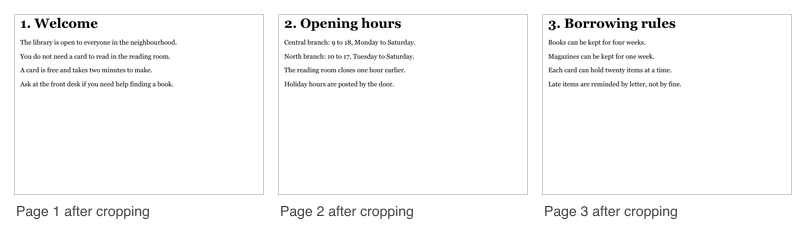
Output: cropped.pdf, 6 pages, 41 KB
How to crop PDF pages
To crop pdf online, start by uploading the PDF you want to crop. This pdf crop tool makes a new file named cropped.pdf and leaves your original file unchanged. The new file keeps the same number of pages, and text, pictures, bookmarks and form fields are kept.
Set your margins or rectangle, then run the job. When it finishes, the result panel shows a preview and tells you if the file had minor damage that was repaired automatically.
Results vary with the file. Our measurements were made on generated test files, not real documents, so check your own output.
Crop PDF by cutting margins or keeping a rectangle
You can crop pdf file pages with either method. Cut margins removes an amount from each edge of the page as you see it. Enter top, right, bottom and left values. An empty field counts as 0, and at least one margin must be above 0.
Keep a rectangle works the other way. You enter x and y, measured from the top-left corner of the visible page, and the width and height of the part to keep.
Use margins when you want to trim the same edges on every page. Use a rectangle when you want one fixed area.
Units: millimeters, points, inches or percent
The tool offers millimeters (the default), points, inches and percent. One inch equals 72 points, and 25.4 mm.
Millimeters, points and inches are applied to every chosen page exactly as you type them. Percent is measured against the width and height of each page, up to 100 percent.
In our test, 10 percent on the top and bottom of an A4 page (594.96 x 841.92 pt) gave a page of 594.96 x 673.5 pt. Results vary with the file.
Choose the pages
Leave the Pages field empty to crop all pages. To crop pdf document pages in a group, type numbers and ranges, such as 1-3,5. Page numbers start at 1.
In our test, pages 2 and 3 were cropped and the other four pages stayed A4 in size.
A page number past the last page makes the job fail, and your credits are returned.
Hiding is not deleting: do not use it to remove content
Cropping sets the visible area of the page. Everything outside that area stays in the file. A person who changes the page box back, or copies the text, can get the hidden content again.
In our test, a header line hidden by the top margin was still found in the text of the cropped file. The cropped file had the same 1409 characters as the original.
Do not use Crop PDF to remove private, personal or sensitive information. Use a method that removes the content from the file itself.
Crop only or also change the page size
The default option, "Hide the outside only (CropBox)", sets the visible area and keeps the page size. PDF programs show and print the crop box, as the PDF standard says. We checked the result with Poppler, a PDF program, and have not tested every viewer.
The option "Also change the page size (MediaBox)" also sets the page size to the cropped size and removes the trim, bleed and art boxes. Use it only if a program ignores the crop. The cropped-away content stays in the file either way.
PDFs with pages of different sizes
Millimeters, points and inches are applied to every chosen page. If a page is too small for the crop, the whole job fails, nothing is made, and the message names the page and its size.
For files with mixed page sizes, use percent. In our test, a PDF with an A4 page and a 100 x 150 mm page failed with millimeter margins, but 10 percent on all sides worked for all 7 pages.
You can also run the tool again for the pages of each size, using the Pages field.
Limits: size, pages and credits
The free web tool allows 20 jobs per day per visitor. This count is shared with merge, split, rotate, delete pages, PDF to image and image to PDF. You can upload one PDF per job, up to 10 MB without an account or 50 MB when you are signed in. Without an account, PDFs can have up to 100 pages. Signed in, the limit is 500 pages.
A signed-in job costs 1 credit, plus 1 credit for each started 20 MB of the result beyond the first 20 MB. Failed and timed-out jobs are refunded in full.
The free web tool gives an anonymous job 30 seconds and a signed-in job 60 seconds. The web tool handles one job at a time.
Crop PDF from code
Upload the file first. Send the raw bytes to https://api.aiipworld.com/v1/uploads with the Content-Type application/pdf. The answer contains an upload_id. Each upload is for one file, can be used once, and expires after 1 hour if unused.
Then send a POST to https://api.aiipworld.com/v1/pdf-jobs with JSON that includes op set to pdf_crop, your params, and files as a list with your upload_id. Use either margins or rect, not both. Poll GET /v1/jobs/:id until the job succeeds, fails or times out.
Use Authorization: Bearer <API key>, or the x-api-key header. The page shows a ready cURL, Node and Python example built from your settings. Errors include 400 invalid_params, 413 file_too_large, 422 not_a_pdf, 404 upload_not_found, 402 insufficient_credits and 429 rate limited. A failed job can return encrypted_pdf, corrupt_pdf, page_out_of_range or bad_params. See /docs/ for the general API.
Privacy: what happens to your file
Your file is sent to our server, because nothing is processed in the browser. We use the uploaded file only to make the result. The working copy of your upload is deleted as soon as the job ends, whether it succeeds or fails.
In the free web tool, the result is deleted after 10 minutes. No history is kept, and download links are short-lived.
You must have the right to use what you upload, as set out in our Acceptable Use Policy.
Questions
Is this a free PDF cropper online?
Yes. It is a free PDF cropper that runs in your browser, so there is nothing to install, and this online PDF crop tool needs no account within the daily limit.
Can I trim or clip a PDF to remove margins?
Yes. To trim PDF margins or clip PDF pages to one area, choose "Cut margins" or "Keep a rectangle". Cropping PDF pages hides the cut-off parts; it does not delete them.
Can I crop a PDF for free?
Yes. You can crop pdf free of charge in the web tool, without signing up, within the limit of 20 jobs per day per visitor.
Does cropping delete the parts I cut off?
No. Cropping hides the outside of the crop, and the cut-off parts stay inside the file.
Can I use cropping to hide private information?
No. Hidden content can be restored by changing the page box back or by copying the text, so do not use cropping to remove sensitive content.
How do I crop only some pages?
Type the page numbers or ranges in the Pages field, such as 1-3,5. Leave the field empty to crop all pages.
How do I keep one area of the page?
Choose "Keep a rectangle" and enter x and y from the top-left corner of the visible page, then the width and height of the part to keep.
Why does the tool say the crop does not fit on a page?
The crop would leave less than 1 pt of that page, or reach outside it. The message names the page and its size, and the whole job fails with nothing made.
How do I crop a PDF with pages of different sizes?
Use percent, which is measured against each page's own size. Or run the tool again for the pages of each size using the Pages field.
Does cropping change the quality or the file size?
The pages are not re-drawn and the file is not re-compressed, so the file size stays about the same. Results vary with the file.
Can I crop a password-protected PDF?
No. Encrypted PDFs are refused. No password is accepted, and no attempt is made to open or break the protection.
Can I crop a PDF in my own code?
Yes. Upload the file to the uploads endpoint, then create a pdf_crop job with your upload_id and poll the job until it finishes. See /docs/ for details.
Need this in your app or in bulk?
This tool runs on the same platform as the API, so the same merge, split or rotate is two HTTP requests from your code: upload each PDF, then start the job. A free account includes 100 credits a month.