
PPT to PDF
Convert PPT and PPTX files to PDF here for free, with no signup. Choose your PowerPoint file, wait a few seconds and download the PDF. The conversion runs on our server with LibreOffice, not with Microsoft PowerPoint, and fonts that are not installed there are replaced by similar ones, so line breaks can differ from PowerPoint. Check the PDF before you send it.
- Without an account: 10 files a day, up to 10 MB each, and 50 PDF pages. Signed in: up to 50 MB and 500 pages.
- Fonts that are not installed on our server are replaced by similar ones, so line breaks can differ from PowerPoint. The PDF is not an exact copy of what PowerPoint prints.
- Hidden slides and speaker notes are left out of the PDF. Animations, transitions, audio and video do not play in a PDF.
- A file with macros is converted and the macros are not run. A file with an open password is refused.
Drop a file here or choose it. One file per conversion, up to 10 MB. Password-protected files are refused.
The PDF uses the page setup saved in the presentation. At most 50 pages are converted without an account (500 when signed in).
Complete the human check to enable the button.
Result
Your PDF will appear here.
Without an account: 10 files a day, up to 10 MB each and 50 PDF pages, 30 seconds each. Signed in: up to 50 MB and 500 pages, 60 seconds.
Retention: web-tool results are deleted after 10 minutes. API results are kept 1 day on the free plan and 7 days on Starter and Pro (30 days on Business and Scale). A record of each job (type, time, status and credits, not what you submitted) is kept for 30 days without an account, or while your account exists if you are signed in.
No account needed
10 conversions a day without an account, up to 10 MB each. No watermark.
Macros are never run
A file with macros is converted as it is. The macros are not run, and the PDF has none. The page tells you when a file had macros.
Deleted automatically
Web tool results are removed after 10 minutes.
Privacy: what you submit is used only to make this file. It is deleted when the job ends, also from the job record, and the result is deleted after 10 minutes. See the privacy policy.
Do this from your code
The same conversion from your own code: upload the file, start an office_to_pdf job, poll the job and download the PDF. There are no settings to send. The examples use your file name.
curl -X POST "https://api.aiipworld.com/v1/uploads" \
  -H "Authorization: Bearer $AIIPWORLD_API_KEY" \
  -H "Content-Type: application/octet-stream" \
  --data-binary @slides.pptx   # returns {"upload_id": "UPLOAD_ID_1", ...}

curl -X POST "https://api.aiipworld.com/v1/pdf-jobs" \
  -H "Authorization: Bearer $AIIPWORLD_API_KEY" \
  -H "Content-Type: application/json" \
  -d '{"op":"office_to_pdf","params":{},"files":["UPLOAD_ID_1"]}'
# returns {"job_id": "...", "status": "queued"}; then poll:
curl https://api.aiipworld.com/v1/jobs/JOB_ID -H "Authorization: Bearer $AIIPWORLD_API_KEY"
Retention
Web-tool results are kept 10 minutes; free API results 1 day; Starter and Pro results 7 days; Business and Scale 30 days.
In one sentence
A free online tool that converts a PowerPoint presentation (PPT, PPTX or ODP) to a PDF with one page for each visible slide, using LibreOffice, with substitute fonts and without running any macros.
Key facts
- Input: one PPT, PPTX or ODP file up to 10 MB without an account (50 MB signed in), read by content; a file with an open password is refused. The PDF stops at 50 pages without an account (500 signed in), and a conversion stops after 30 seconds (60 signed in).
- The conversion runs with LibreOffice, not PowerPoint: Calibri, Cambria, Arial, Times New Roman and Courier New are drawn with Carlito, Caladea and Liberation fonts of the same widths, and other fonts that are not installed are replaced by Noto fonts, so line breaks can differ from PowerPoint.
- Hidden slides and speaker notes are left out of the PDF; animations, transitions, audio and video do not play in a PDF; a presentation with macros is converted and the macros are not run.
- In our test a generated 7 slide deck of 55 KB with one hidden slide became a 6 page PDF of 55 KB in about 1 second of job time, on pages of 960 x 540 points; results vary with the file.
- API: POST the file to https://api.aiipworld.com/v1/uploads with Content-Type application/octet-stream, then POST https://api.aiipworld.com/v1/pdf-jobs with op office_to_pdf, an empty params object and the upload id, and poll GET /v1/jobs/:id.
- Free without an account: 10 files per day per visitor, no watermark. Signed in, each file costs 1 credit, plus 1 credit for each started 50 pages of the PDF beyond the first 50 and 1 credit for each started 20 MB beyond the first 20 MB; failed conversions are refunded (100 free credits every month).
- Files are deleted automatically: 10 minutes after conversion without an account, 1 day with a free account.
Sources
- Ecma International: ECMA-376 Office Open XML file formats
- LibreOffice: supported file formats
- PDF Association: ISO 32000-2 (PDF 2.0)
Last reviewed:
How it works
- Choose your presentation. The tool reads PPT, PPTX and ODP files, and it checks the file type from the content, not from the name.
- Press "Convert PPT to PDF". Without an account you pass a short human check first.
- Wait for the result panel. It shows a preview, the page count and the time the conversion took.
- Download the PDF and compare it with your slides before you send it. The PDF has one page for each slide that is not hidden.
Example output
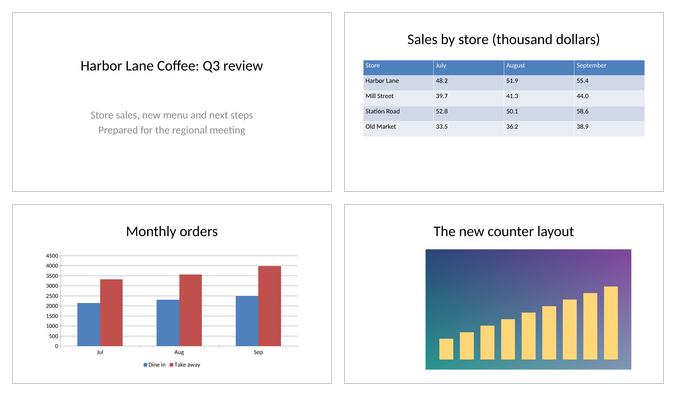
How to convert PPT to PDF
Convert PPT to PDF in four steps: choose the file, run the conversion, look at the preview, and download the PDF. The tool returns one PDF with one page for each slide that is not hidden, named like your file with the ending .pdf. Your original file is not changed.
You can convert PPT to PDF online with this tool without installing anything. Anonymous use needs a human check through Cloudflare Turnstile. Signed-in users skip it and use credits.
- Keep your original presentation. The PDF is a picture of the slides, not an editable copy.
- Open the PDF and page through it once before you send it.
PPT, PPTX and ODP files
The tool reads PPT (the older PowerPoint format), PPTX (the newer one) and ODP (OpenDocument, written by LibreOffice and others). The type is read from the file content, so a renamed file is still recognised, and a file that is not an Office or OpenDocument file is refused.
If you search for pptx to pdf, powerpoint to pdf or convert ppt to pdf, this is the same tool for every format. The same converter reads Word and Excel files too, but this page is written and tested for presentations. For spreadsheets use Excel to PDF.
What happens to the layout and the fonts
The converter is LibreOffice, not PowerPoint. It draws each slide at the slide's own size: in our test a 16:9 deck came out as pages of 960 x 540 points (13.33 x 7.5 inches). Tables, charts and pictures are drawn, and text stays real text, so you can select and search it.
Microsoft's own fonts are not installed on our server. Calibri is drawn with Carlito, Cambria with Caladea, Arial with Liberation Sans, Times New Roman with Liberation Serif and Courier New with Liberation Mono. These substitutes have the same character widths, so lines usually break in the same places. Fonts such as Segoe UI, Aptos, Verdana, Tahoma, Comic Sans MS and Georgia are not installed and are replaced by Noto Sans or Noto Serif, which have other widths, so lines can break in other places and text can move.
The fonts used are embedded in the PDF, so the PDF looks the same on every device. This tool does not claim to match PowerPoint exactly. Check the PDF before you send it, especially slides with tight text boxes.
Chinese, Japanese and Korean text uses Noto CJK fonts that are installed. Chinese text that has no language set in the file is drawn with Simplified Chinese letter shapes, and text marked as Traditional Chinese, Japanese or Korean uses those shapes.
Hidden slides, speaker notes and animations
Hidden slides are left out of the PDF. In our test a 7 slide deck with one hidden slide gave a 6 page PDF. Speaker notes are not printed either: in our test the notes text was not in the PDF.
A PDF is a still document, so animations, slide transitions, audio and video do not play in it.
Macros and password-protected files
A presentation with macros, such as a PPTM file, is converted as it is. The macros are not run, the PDF has none, and the result panel tells you that the file had macros. Be careful with a file that has macros if you did not expect them.
A presentation that has an open password is refused, and no credits are used. A PPTX file gets a message that says it is password-protected. An old PPT file may get a message that the file looks damaged instead, because the converter cannot open it either way. Remove the password in PowerPoint, save the file, and upload it again.
Limits: size, pages, time and credits
A file can be up to 10 MB without an account and 50 MB signed in. The PDF stops at 50 pages without an account and at 500 pages signed in. When the PDF reaches the limit the result panel says so, and the rest of the presentation is not converted. A conversion is stopped after 30 seconds without an account and 60 seconds signed in. Free web tool use is limited to 10 files per day per visitor.
A conversion uses 1 credit, plus 1 credit for each started 50 pages of the PDF after the first 50 pages, plus 1 credit for each started 20 MB of the PDF after the first 20 MB. Failed and timed-out conversions are refunded in full. Results are kept for 10 minutes in the free web tool.
Convert PPT to PDF from code
Upload the file first. Send a POST to https://api.aiipworld.com/v1/uploads with the raw bytes and Content-Type application/octet-stream. The answer has an upload_id. Then send a POST to https://api.aiipworld.com/v1/pdf-jobs with JSON {op, params, files: [upload_id]}, using op office_to_pdf and an empty params object. Poll GET /v1/jobs/:id until the job succeeds, fails or times out.
There are no settings to send. The page shows a ready cURL, Node and Python example. Errors include 422 password_protected, 415 unsupported_file, 422 not_an_office_file, 413 file_too_large and 429 office_daily_quota_exceeded, and job errors such as corrupt_input, unsupported_input, timeout and memory_limit.
Questions
Can I convert PPT to PDF for free?
Yes, you can convert PPT to PDF for free in the web tool, with no signup. Anonymous use needs a human check, and it is limited per day per visitor.
How do I convert a PowerPoint to PDF?
Choose the PowerPoint file, press the button and wait for the result panel. Check the preview and download the PDF. It has one page for each slide that is not hidden.
What is the difference between PPT and PPTX?
PPT is the older PowerPoint file format and PPTX is the newer one. This tool reads both, and it also reads ODP files from LibreOffice and others.
Will the PDF look exactly like my slides in PowerPoint?
Often close, but not always exactly. The conversion runs with LibreOffice, and fonts that are not installed on our server are replaced by similar ones, so lines can break in other places. Check the PDF before you send it.
Why do the fonts look different in the PDF?
Microsoft's own fonts are not installed. Calibri, Cambria, Arial, Times New Roman and Courier New are replaced by fonts with the same character widths, and other fonts such as Segoe UI or Aptos are replaced by Noto Sans or Noto Serif, which have other widths.
Are hidden slides and speaker notes in the PDF?
No. Hidden slides and speaker notes are left out of the PDF. In our test a deck with one hidden slide gave a PDF with one page less, and the notes text was not in the PDF.
Do animations and transitions work in the PDF?
No. A PDF is a still document, so animations, slide transitions, audio and video do not play in it.
Does the tool run the macros in my presentation?
No. A file with macros is converted as it is, the macros are not run, and the PDF has none. The result panel tells you that the file had macros.
Can I convert a password-protected PPT?
No. A presentation with an open password is refused, and no credits are used. Remove the password in PowerPoint and upload the file again.
How many slides can I convert?
The PDF can have up to 50 pages without an account and 500 pages signed in. A longer presentation is cut at the limit, and the result panel says so.
Is my presentation kept on your server?
The uploaded file is deleted as soon as the conversion ends. The PDF is kept for 10 minutes in the free web tool, so you can download it, and then it is deleted.
Does it convert Word or Excel files too?
The converter reads Word, Excel and OpenDocument files too, and the upload box takes them, but this page is written and tested for presentations. For spreadsheets use Excel to PDF.
Can I convert PPT to PDF in my own code?
Yes, you can use the API with op office_to_pdf. Upload the file, create a job, and poll until it finishes. There are no settings to send.
Need this in your app or in bulk?
This tool runs on the same platform as the API, so the same merge, split or rotate is two HTTP requests from your code: upload each PDF, then start the job. A free account includes 100 credits a month.